Cold email on autopilot. Sent from
Gmail.Outlook.any SMTP.
Connect your mailboxes, import a CSV, build a sequence. Beeving warms up your senders, rotates them, follows up on its own and files every reply by intent. You only open the ones that say yes.
Trusted by B2B outbound teams · Read their stories
Black Friday 2025 Running
250 leads · 4 senders
- Email 1 Sent Mon 09:02 Great to connect, {{first_name}}!
- Opened Mon 09:41 marie@northbeam.io opened on iPhone
- Wait 2 days, then only if no reply
- Email 2 Sent Wed 09:15 Quick follow-up
- ML Marie L. · Northbeam Interested “Let's talk next week, Tuesday works.” Wed 11:08
- Sequence stopped for Marie · handed to you
Works with
- Gmail
- Outlook
- Google Workspace
- Microsoft 365
- Any SMTP / IMAP
How it works
From a mailbox to booked meetings, in four steps.
Ten minutes of setup. Then it runs every weekday, on its own.
- 01
Connect your mailboxes
Gmail, Outlook or any SMTP/IMAP. A live check before the account is saved, and warmup starts the same day.
- 02
Import your contacts
Drop a CSV. Columns map themselves, duplicates and blocklisted addresses are dropped before anything is sent.
- 03
Build the sequence
Email steps, waits and conditions. If they open, send this; if not, wait three days and try another angle.
- 04
Replies land, sorted
Every answer comes back to one inbox, filed by intent. Interested goes to you; out-of-office reschedules itself.



The product
Three screens you will actually live in.
The campaign, the senders, the replies. Everything else is settings.
Black Friday 2025 Running
250 leads · 4 senders · Mon–Fri, 9:00–17:00
1,000
Sent
57%
Opened
17%
Clicked
9.2%
Replied
- Email Done
Great to connect, {{first_name}}!
sent 250opened 61.2%replied 7.6%
-
Wait 2 days
Email DoneQuick follow-up
sent 189opened 44.0%replied 3.1%
-
Wait 3 days
Condition DoneIf replied
Yes: stop the sequence. No: keep going.
- 4
Wait 2 days
LinkedIn ScheduledVisit profile, then message
Scheduled for 140 contacts still silent.
Sender Manager
Overview of all email accounts and sending capacity.
4
Accounts
128
Sent today
800
Daily limit
98.9%
Delivered
| Account | Type | Status | Today | Warm-up |
|---|---|---|---|---|
| Primary Accountantoine@beeving.com | SMTP | Active | 42 / 200 | 94 |
| Customer Supportsupport@beeving.com | Gmail | Active | 20 / 200 | 91 |
| Marketingmarketing@beeving.com | Outlook | Active | 32 / 200 | 88 |
| Sales Outreachsales@beeving.com | SMTP | Active | 34 / 200 | 96 |
Inbox23 new
All senders · all campaigns
- ML Marie L. · Northbeam 11:08 Let's talk next week, Tuesday works for me. Can you send an invite? Interested Black Friday 2025
- KB Karim B. · Fluxio 10:52 Not the right moment, circle back in Q2 please. Not now Black Friday 2025
- AP Ana P. · Lumen Labs 09:31 I am out of the office until January 6 with limited access to email. Out of office Agencies · Q4 Follow-up moved to Jan 7
- TR Tom R. · Kite & Co Yesterday Interesting. What does onboarding look like for a team of five? Interested Agencies · Q4
- JD Jonas D. · Parcelo Yesterday Please remove me from this list. Unsubscribed Black Friday 2025 Address blocklisted

Tracked
Every number you need, on one screen.
Open, click and reply rates per step, per sender and per campaign. Replies filed by intent. Nothing to export to find out what worked.
- 01 Campaign summarySent, opened, clicked, replied. One line per campaign, live.
- 02 Email activitySends and opens day by day, over 7, 14 or 30 days.
- 03 Sender rotationWhat each mailbox sent today, against its own limit.
- 04 Warm-up placementInbox, spam or missing: where the warmup emails landed.
- 05 Replies by intentInterested, not now, out of office, unsubscribe. Filed on arrival.
- 06 Step performanceWhich step gets the opens, and which one gets the replies.

Stories
Teams that send with Beeving.
What they measured, in their words. Each story lives on the page of the solution or industry it comes from.
- B2B Cold Email
“Our response rate went from 2% to 11% using Beeving sequences. Email rotation was a game changer for our deliverability.”
JC Julie ChenSales Manager · TechRecruit 11%Response rate - Lead Nurturing
“Thanks to Beeving's lead scoring, our sales team only contacts leads with 80+ points. Our closing rate increased by 35%.”
PL Pierre LefebvreSales Director · CloudServices Pro +35%Closing rate - Email Onboarding
“Our D+7 activation rate went from 23% to 58%. Beeving's onboarding emails completely changed the game.”
SB Sophie BernardProduct Manager · WorkflowHQ 58%D+7 activation - Customer Reactivation
“We recovered 23% of our inactive customers in 2 months. Beeving's reactivation sequences auto-trigger as soon as a customer disengages.”
AR Antoine RousseauCustomer Success Lead · SaaSify 23%Customers reactivated - Email Marketing for SaaS & Tech
“We went from 12% to 34% trial-to-paid conversion in 2 months. Beeving's onboarding sequences transformed our activation.”
SK Sarah K.Head of Growth · SaaS Company +183%Trial conversion
- Email Marketing for B2B Services
“Beeving helped us sign 8 new clients in 3 months, only through cold email. Our acquisition cost was divided by 4 compared to LinkedIn Ads.”
ML Marcus L.Founder · B2B Services Firm 8New clients - Email Marketing for Marketing Agencies
“Beeving transformed how we acquire clients. We now have a predictable pipeline that generates 15+ qualified leads per month without the manual grind.”
ER Elena R.Founder · Marketing Agency 15+Leads/month - Email Marketing for Consulting Firms
“As a solo consultant, I didn't have time for business development. Beeving runs my outreach in the background while I focus on client work. I've doubled my pipeline in 6 months.”
AM Alex M.Principal Consultant · Consulting Firm 2xPipeline growth - Email Marketing for B2B E-commerce
“We've increased repeat order rate by 45% since implementing Beeving's automated reorder sequences. The ROI was positive within the first month.”
PS Priya S.E-commerce Director · B2B E-commerce Company +45%Repeat orders

Demo
See the workspace before you sign up.
This is the real interface, replayed: a campaign built, senders connected, replies coming in. Two minutes, no account.
Open the full demo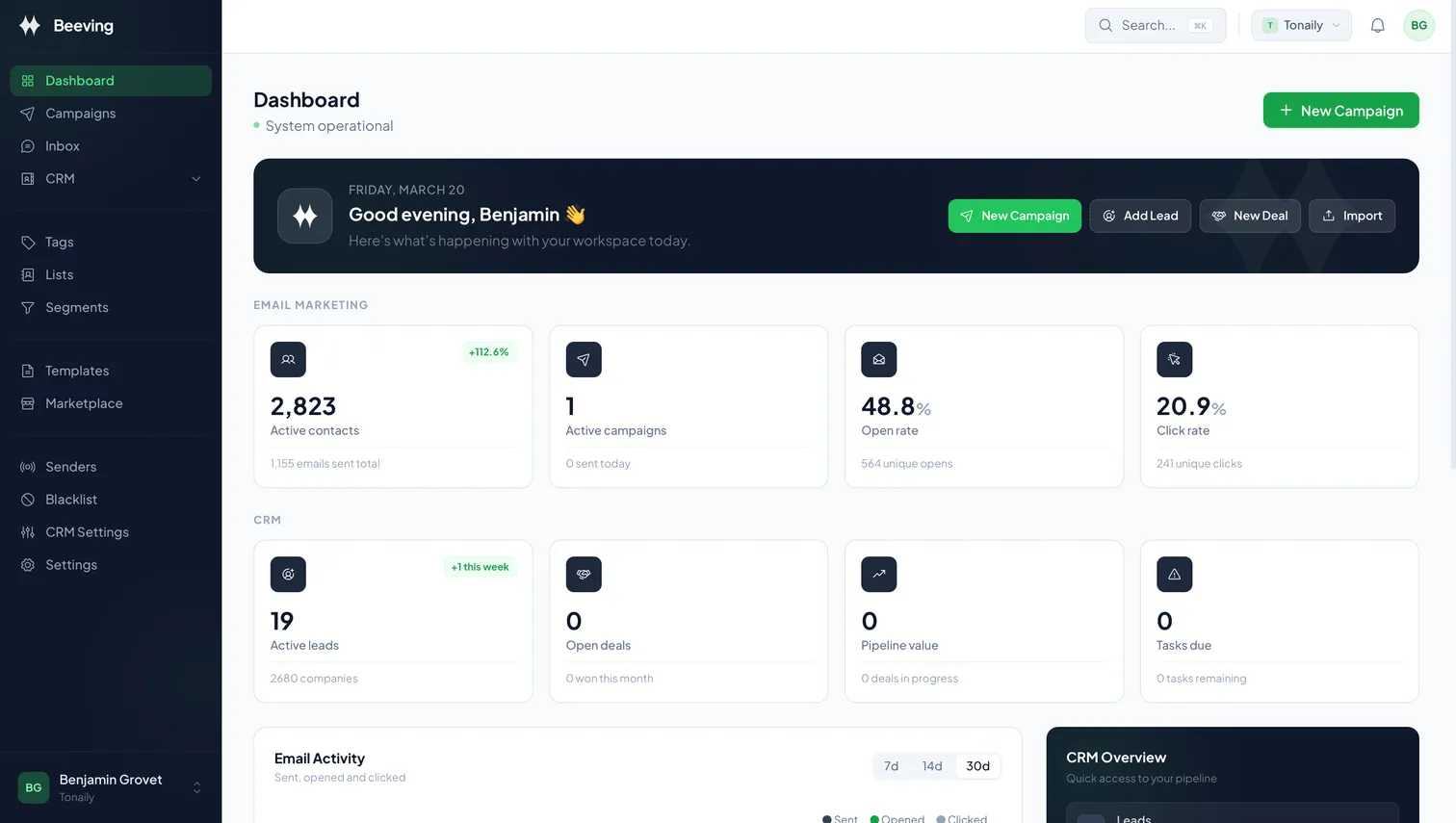
Pricing
Per workspace. No surprises.
Every plan includes warmup, sender rotation and enrich credits. 14 days free, no card.

| Feature | Launch For a founder testing the channel €29 /mo per workspace | Growth Popular For SMBs doing outbound seriously €49.90 €79 /mo Beta price · locked for your first year | Scale For growth teams and lean agencies €179 /mo per workspace | Agency For agencies running client outbound €299 /mo + €49 per client workspace |
|---|---|---|---|---|
| Domains | 2 | 8 | 32 | Per client workspace |
| Mailboxes | 20 | 80 | 320 | Per client workspace |
| Sequences | 3 | Unlimited | Unlimited | Unlimited |
| Contacts | 1,000 | Unlimited | Unlimited | Unlimited |
| Users | 1 | 3 | Unlimited | Unlimited |
| Enrich credits / month | 150 | 500 | 1,500 | Per client workspace |
| Email warmup | ||||
| Email rotation | ||||
| LinkedIn accounts | — | 1 | 2 | Per client workspace |
| API access | — | — | ||
| Client workspaces | — | — | — | |
| Client permissions and reporting | — | — | — | |
| White label | — | — | — | |
| Priority support | — | — | — | |
| Start trial | Start trial | Start trial | Start trial |
14-day free trial · No credit card · Cancel anytime

- 01What's the difference with Mailchimp or Lemlist?
- Mailchimp is for newsletters. Beeving is for cold outreach: multi-step sequences, sender rotation, warmup and behaviour-based follow-ups. Lemlist is closer, but Beeving is cheaper per user and you own your data.
- 02How do you ensure deliverability?
- Each mailbox is warmed up before it sends, capped at a daily limit, and sends are spaced at random intervals so the pattern looks human. Campaigns rotate across your senders, and SPF, DKIM and DMARC are checked on every domain.
- 03Do I need to buy new domains or mailboxes?
- No. Connect the Gmail, Outlook or SMTP accounts you already have. If you want more capacity, add mailboxes: every plan includes a domain and mailbox allowance.
- 04What does the LinkedIn module do?
- It adds LinkedIn steps to the same sequence: a profile visit, a connection request, a message. One LinkedIn account per plan, run at a human pace, alongside the email steps.
- 05Is Beeving GDPR compliant?
- Yes. Unsubscribe requests are detected in replies and the contact is never emailed again. You can export or delete your data at any time, and it is never sold.
- 06Can I migrate from another tool?
- Yes. Export your contacts to CSV from your current tool and drop the file into Beeving: columns map themselves. It takes about ten minutes, and we help if you get stuck.

Your first campaign,
sent this afternoon.
14 days free · No credit card · Cancel anytime