Onboarding
Onboarding emails that activate your customers
Guide each new customer to their first success. Automated sequences based on their actual progress.
The challenge
What drives user activation
Only 60% of new signups come back. Here's why.
- 01
Users who stall after signup
40% of your new signups log in only once. Guidance drives adoption.
- 02
Support overwhelmed with basic questions
Your CSMs spend their time answering the same questions. Manual onboarding hits a ceiling fast.
- 03
Time-to-value too long
Your customers take 3 weeks to see your product's value. Many abandon before then.
- 04
One-size-fits-all journey
All your customers receive the same emails, regardless of their plan, industry, or level.
The answer
Onboarding that activates your customers
Guide each user to their first Aha moment.
-
Behavioral triggers
Trigger emails when a user completes an action, or when it's still pending. Segment integration.
-
Adaptive journeys
The onboarding path adapts to the subscribed plan, persona, and activated features.
-
Interactive checklists
Integrate progress bars in your emails. User sees their progress in real-time.
-
Inactivity alerts
Get notified when the critical step is still pending after X days. Targeted human intervention.
How it works
From setup to first replies, in four steps.
Ten minutes of setup. Then it runs every weekday, on its own.
- 01
Connect your mailboxes
Gmail, Outlook or any SMTP/IMAP. A live check before the account is saved, warmup starts the same day.
- 02
Import your contacts
Drop a CSV. Columns map themselves, duplicates and blocklisted addresses are dropped.
- 03
Build the sequence
Email steps, waits and conditions. Start from one of the templates below.
- 04
Replies land, sorted
Every answer comes back to one inbox, filed by intent. Interested goes to you.
Sequences
Step-by-step onboarding sequences
Workflows that increase your activation rate.
Freemium SaaS onboarding
Activate your free users to their first success
- 5 steps
- 2 emails
- D+7 span
Enterprise customer onboarding
Accompany large accounts to deployment
- 5 steps
- 5 emails
- D+14 span
Inside Beeving
What you will look at every morning.
Open, click and reply rates per campaign, replies filed by intent, and what each mailbox sent today.
-
Campaign summary
Sent, opened, clicked, replied. One line per campaign, live.
-
Replies by intent
Interested, not now, out of office, unsubscribe. Filed on arrival.
-
Sender rotation
What each mailbox sent today, against its own limit.
Playbook
How teams onboard customers on Beeving
The first week decides activation. Short emails, one action each, triggered by the next step the user has yet to take.
- 01
Start the sequence from the signup
Import new signups daily or push them from your app. Each contact enters the onboarding sequence the day they arrive.
Contacts · Import - 02
Branch on the action the user takes
If the user connected their account, skip the reminder. Conditions read the fields you update, so the sequence follows the user.
Campaigns · Conditions - 03
Send from a named person
Onboarding emails from a founder or a CSM get answered. Each sender has its own signature and mailbox, warmed up like the rest.
Senders · Signatures
Go further
Email onboarding for your industry
Activation strategies by industry
FAQ
Email Onboarding FAQ
Questions about automated onboarding
How does Beeving know if a user completed an action?
Via our API or Segment/Mixpanel integrations. When an event is tracked (e.g., 'first_project_created'), Beeving receives it in real-time and adjusts the sequence accordingly.
Can we create different journeys per pricing plan?
Yes, use conditions to route users: if plan = 'enterprise', sequence A. If plan = 'starter', sequence B. You can also condition by industry, company size, etc.
How to measure onboarding effectiveness?
Beeving provides dedicated analytics: completion rate of each step, average activation time, correlation between opened emails and product activation.
Can we integrate interactive elements in emails?
Yes, add progress bars, tracked CTA buttons, and deep links to specific features in your app.
The whole platform
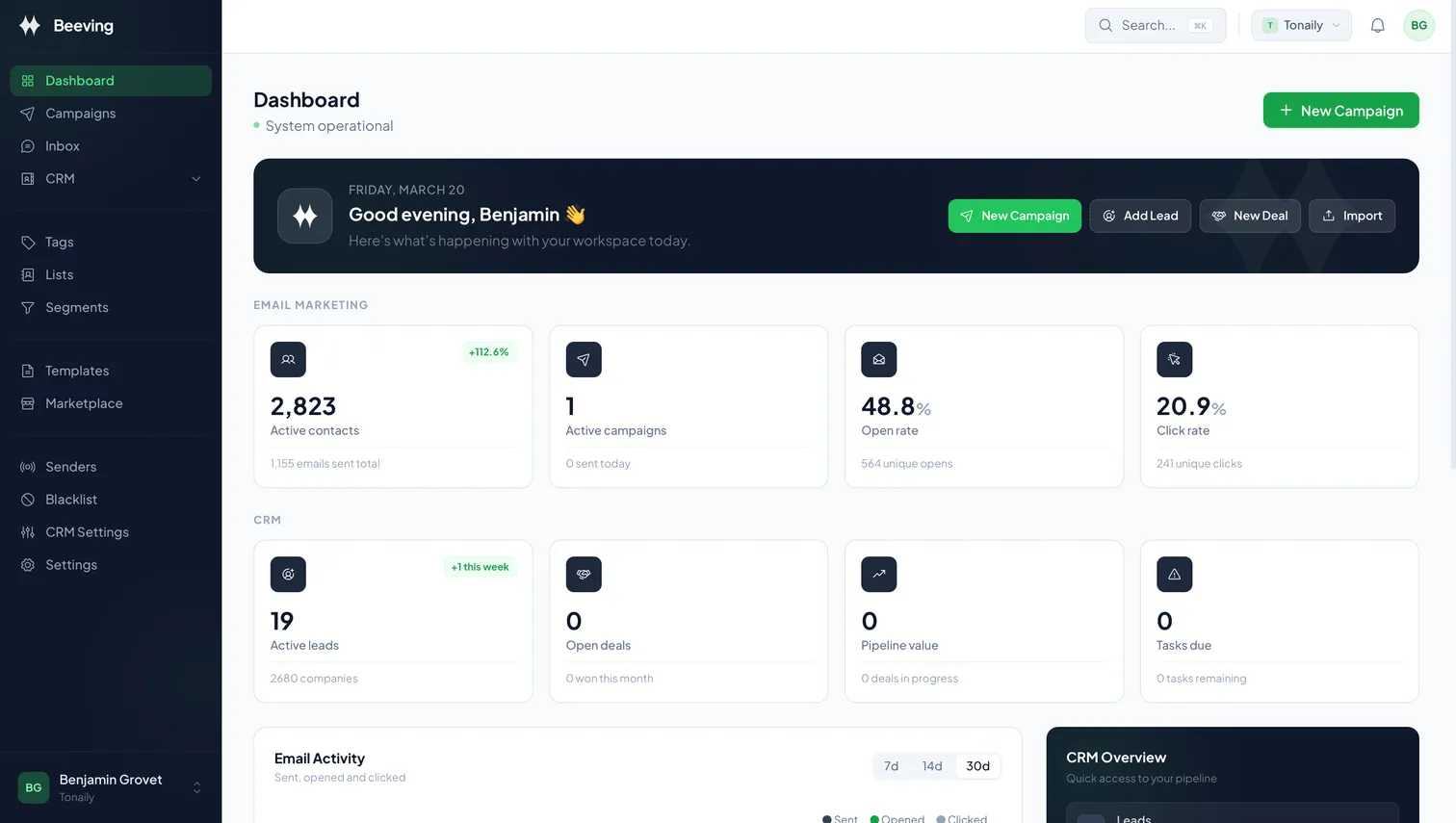
One dashboard for all of it
Campaigns, senders, replies and contacts on one screen. This is the real interface, exactly as you will use it.
Free plan · Email-only sign-up